Smartphone Blast!:  Android  |  BlackBerry  |  iPad / iPhone / iPod  |  HP / Palm / webOS  |  Windows Phone  |  Gadgets
  Windows Phone Blast!
 

Windows Phone 7 News, Blog, and Accessories


Clean Out Those Temp Files With Space Reclaimer

Software Reviews - By: pdaBlast! Staff - October 03, 2004


So you've been using your Pocket PC for awhile and everytime you want to add a new program you realize you're running out of space. You run through your memory manager to find out where all your memory went but that gives you only a vague view offile explorer to find out where all your space went. So you want to free some space but where do you start? What you may not realize is temporary files are created on your Pocket PC nearly everytime you use it. Internet temp files, cookies, history files and the rest all take up space that can be freed. Not only are these files taking up valuable real estate on your PDA but it is also causing a performance loss. When your Pocket PC searches through your files it has to search through the garbage that you've collected along the way. So now you need to clean it right? Do you really want to go through and hunt through each folder to see where these files are? Not really.

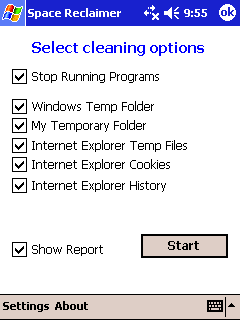
Enter Space Reclaimer. Space Reclaimer is a little utility that will clean most of your temporary files for you. It's quite simple to use. Just install the file onto your PDA and launch it. There will be a shortcut for you in your Programs folder.

Once launched you are presented with the option of telling Space Reclaimer where to search for junk. As you can see (picture above) it's very easy to uncheck the boxes next to the things you do not want to do.

One feature I really like is the ability for Space Reclaimer to shut down running programs. This can be very helpful as I often find myself going to the memory manager to try to shut down programs manually. The only issue you might have is if you're listening to mp3 files while you're running Space Reclaimer. It will try to shut down Windows Medial Player which will mean your music will stop playing. Other than that the shutting down of programs you're not currently using is a real plus.

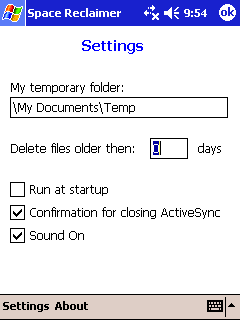
After the program cleans out your Pocket PC it will give you a summary report of what was done. This lets you keep track of what files are deleted. You can also set how Space Recalimer starts with the Settings screen.

Most of us do not need all the temp files so I try to get rid of them. If you do need a specific Internet cookie then simply tell Space Reclaimer not to get rid of your cookies and it will leave them alone. At $5 this software is a real deal. Check it out at the link below and start cleaning out that Pocket PC today!



Related Links:
Buy Now!


Full Story | Email This | Print |
|

Related Stories
Forbes names Microsoft's Steve Ballmer worst CEO
Feeding America charity leaves BlackBerry for Windows Phone
Viber for BlackBerry and Windows Phone released
Nokia snags exclusive app deals for Lumia Windows Phones
Apple Founder Woz likes Windows Phone over Android


blog comments powered by Disqus

Accessory Deals
Accessory Deals
Batteries
Batteries
Battery Covers
Battery Covers
Bluetooth
Bluetooth
Books
Books
Car Kits
Car Kits
Card Readers
Card Readers
Cases
Cases
Chargers & Cables
Chargers & Cables
Cradles
Cradles
GPS Navigation
GPS Navigation
Headphones
Headphones
Headsets
Headsets
Keyboards
Keyboards

Windows Software


More Stories:


BlackBerry has just 3 percent market share in the U.S.

iPhone 5 to feature 4 inch display

Samsung releases Galaxy S III commercial in Europe

Native Firefox for Android reaches beta status

Porsche designed BlackBerry wins Smartphone of the Year Award