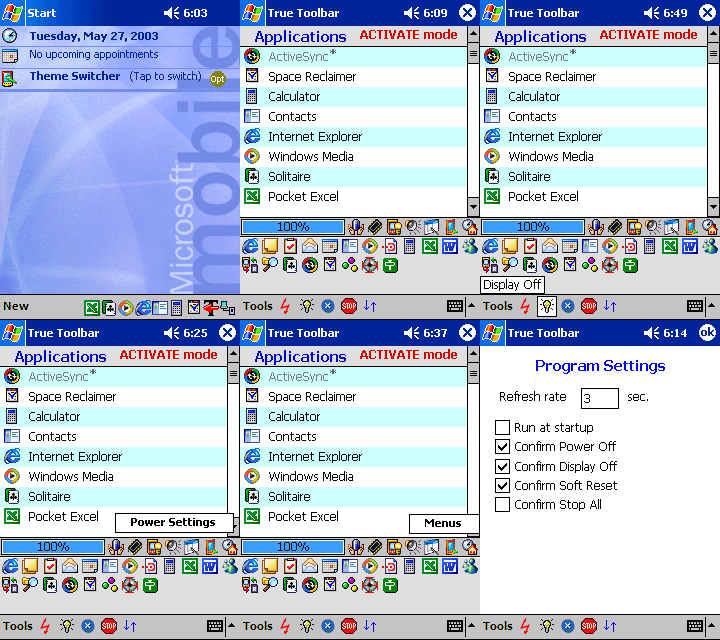
True Toolbar is an application manager, which was designed to start and monitor running applications, close and activate them. The program has an intuitive one-click interface and is extremely fast and easy to use.
True Toolbar starts in silent mode, indicated by an icon in the bottom-right corner of the screen. At this point program is active and is monitoring your device. Icons for other running applications are placed in the same row. You may activate the True Toolbartm interface by tapping this icon or by accessing the Start menu. Other applications can be activated by tapping appropriate icon as well.
Features:
- One-tap switch to any loaded application, start or stop them;
- Real-time application monitoring with convenient desktop style toolbar representation;
- Configurable application launcher with one-tap access to major Pocket PC settings;
- Battery status monitor;
- Display Off i) - power is cut from the entire display unit (not only backlight!), helping you save battery charge when you
- are listening to music. Use hardware power button to restore the screen status;
- Power Off i) - this function allows to turn off the power on your device. There is a difference from the regular hardware
- power button; all running programs will be "frozen" until power is on again. For example if you are listening to Media
- Player, it will continue to play the current track after power is turned on back;
- Soft Reset i) - using a single tap;
- Run at startup - you may configure the program to run automatically after every soft reset;
- Extensive tap-and-hold interface with pull down menus and tool-tips;
- True Toolbar runs in the background, it is extremely optimized, and does not consume the resources of your PDA;
- Online help;
- FREE Lifetime Update is our consolidated policy for all registered customers;