Anyone who has used Pocket IE knows it's functional, but not perfect. A little program by ReenSoft called PIEPlus goes a long way in adding necessary features to PIE. Frankly, I can't figure out why Microsoft did not include these features in PIE, but PIEPlus has come to the rescue.
After installing PIEPlus there's no need to launch the program from your Programs menu. You simply launch Pocket IE and PIEPlus will show up on the bottom taskbar. You'll see the little blue Plus button. Just click the button to access all of the PIEPlus features.
PIEPlus has so many features that I'll probably overlook some of them, but I'll outline the features I like most. The best feature that PIEPlus has is the ability to view standard web pages in "Pocket View" or "Standard View". When going to the pdaBlast.com home page with Microsoft's PIE, the page is skewed. Left to right scrolling is necessary because although PIE resizes the graphics, it cannot squeeze everything in the 240 pixel wide screen. PIEPlus allows you to view the same page in "Pocket View" which optimizes the page for you. You may have to scroll down a bit past menu items and the like, but you can view the important articles without having to scroll left to right. This is a major advantage.
 Standard View |
 Pocket View |
At pdaBlast! we have a mobile version of our site at www.pdablast.com/mobile for PIE, and other mobile browser users, but with PIEPlus, you can go directly to our home page if you'd like. Look at how the screen is optimized (picture above) to fit the entire article blurb within the screen width. This is by far the best feature of PIEPlus. I even use PIEPlus to go to my Yahoo page and get information from there. Very slick! One thing to note: PIEPlus remembers which view you used to access a web page and will open in that view the next time you launch PIE. So if you tend to use "Pocket View" sometimes and "Standard View" at other times for the same web page, you'll need to manually switch between the two views.
Another one of my favorite features of PIEPlus is the ability to open more than one PIE window at a time. This allows you to view more than one web page at a time, and flip between the two. You'll notice that the menu in the picture below allows you to switch between two web pages. I use this feature all the time and you will too.
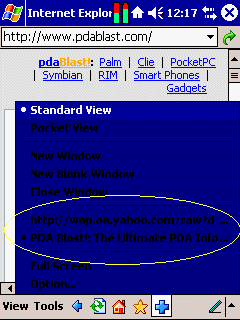
Another nice feature of PIEPlus is the ability to turn on Clear Type while viewing web pages. Some people like the smoothed edges of fonts and find it easier to read this way. With PIE it is not possible but with PIEPlus you can turn this feature on or off. Look at the comparison in the pictures below.
 Standard View |
 With Clear Type on |
PIEPlus includes other features like hardware button mapping, fullscreen mode, D-Pad or Jog Dial navigation and more. You can see most of them in the pictures of the options screens below. Most of them are self explanatory so I won't go through all of the features one by one. Overall I'd say this is a must have program for anyone serious about viewing web pages. You could also go with a program like ThunderHawk which allows you to view pages in landscape mode, but that requires a yearly fee of $49. At $14.95 PIEPlus is well worth the money. You can get your copy right here at PocketPC Blast! so be sure to check this one out.